The mobile OS should broker agent functionality
AI Agents on mobile need a way to access functionality of other apps. The mobile operating system should become the broker, registering & exposing tools and managing permissions, authentication and battery usage.
Such an interface would open up the possibility of OpenClaw-esq behaviour on mobile through third-party apps. These apps could choose to use on-device or remote models but would all use the same APIs and protocols to communicate with applications on your device.
A short story of a pocket agent future
You open your iPhone and choose to update to iOS 28 and enable “Agentic Applications”. The phone screen ripples in colour and welcomes you, guiding you into a new entry in your Settings where you can see all Agents installed on your phone. There’s nothing there but the wizard teaches you that this is where you can find your Agents, manage their permissions & notifications, view the events and logs and spot those using excessive battery.
You’ve been reading about “WetSheep”, a new local-first agent that performs better than any other. As a privacy advocate this is what you have been waiting for so you open the App Store. Installing it is just like any other application - albeit with a longer download as it fetches the model - but soon, you’re ready. You press the fresh fluffy icon and start talking.
“What’s my total net-worth?”
The white circle in front of you pulses. WetSheep uses an on-device model to translate speech to text and understands your intent. Behind the scenes it’s asking iOS what tools it has available and comes up with a plan. WetSheep identifies five applications that may provide an insight into your net-worth: two banks, a multi-currency account, your trading app and a 401k benefits app. All of these require FaceID to log in, but WetSheep doesn’t care. It makes the function calls as they were instructed, and waits.
These functions are defined and provided by each application. getBalance, showBalance,
listPositions… there is a pattern but no common name. All the Agent knows it that they will
likely help it reach it’s goal. But there’s a trick. The Agent is not communicating with the
application, it’s talking to the operating system - iOS 28 itself.
iOS knows this is a new agent. It’s allowed to run but it doesn’t have permission to get this information. Should it? Lets ask the user. Approved, great! But these applications require FaceID to access this information. We can ask once for this session, convenience after all. Everything looks good, so iOS starts the relevant applications in the background and calls the functions. Battery is precious so apps have a finite time to respond in, otherwise they’re silently closed. That’s not the case here. Some numbers, some JSON and a string are passed back to WetSheep via the functions it called. Data can be sensitive so it’s not logged but iOS does keep track of which apps & functions this agent used.
WetSheep collates the data and checks to see if it needs to do anything else to achieve the goal. Everything seems to be present. It finds a relevant way to display the balances from its library of UI elements - a simple Stat total and a table should be enough - and presents it on-screen. Task complete.
You’re impressed! You know there is a third bank account - traditional bricks and mortar, no app - but with the information it had available the agent has done a good job. There are even nice links you can use that take you straight into the relevant app to verify the output. This single interaction has given you the confidence to set WetSheep as your default voice agent. You set the trigger word to “Oi!” in your settings and put your phone back in your pocket.
It’s reassuring to have a privacy focused agentic assistant ready to help you with your life. But when iOS asks if you’d like to allow WetSheep to run autonomously in the background, you clicked “No”. Not…yet.
While the story above is fiction, it doesn’t require technology that doesn’t already exist today. On the desktop, tools like OpenClaw (an open-source agent that can control your computer) have shown that given enough tools and context/memory (and tokens), LLMs are capable of dynamically orchestrating workflows to achieve these goals - and far more complex ones - themselves.
But mobile is fundamentally different. Battery life, sandboxed apps, biometric auth and permissions, all create constraints that add friction to delivering the same experience.
Making pocket agentic assistants a reality
This hypothetical story is to demonstrate what could be possible given a system that exists to enable controlled, secure agentic behaviour.
“Hey Siri, send my ETA to the person I’m meeting.”
“Siri, check me in for my flight when it opens.”
“Siri, how much money do I have in my bank accounts?”
Seemingly simple requests that have stumped Apple for years, costing billions to develop an annoying failure that will soon rely on Google’s Gemini to function (also $1 billion / year…).
OpenClaw - for all it’s security flaws - has not only shown that it’s possible, but that it is something people want. People are willing to use a far-from-perfect product (including buying dedicated computers to run it) to have that fully autonomous feeling.
Mobile devices arguably have access to all the information already through the applications installed by the user. They don’t need to access the complete app store, only the apps that the user has decided are relevant to them (and coincidentally are often already logged in and ready to go).
With the goal of a higher level of autonomy in mind, this article aims to discuss what should be done by mobile operating system providers (dominated by iOS & Android) to enable such functionality in the not-too-distant future.
The Operating System becomes the Agentic Broker
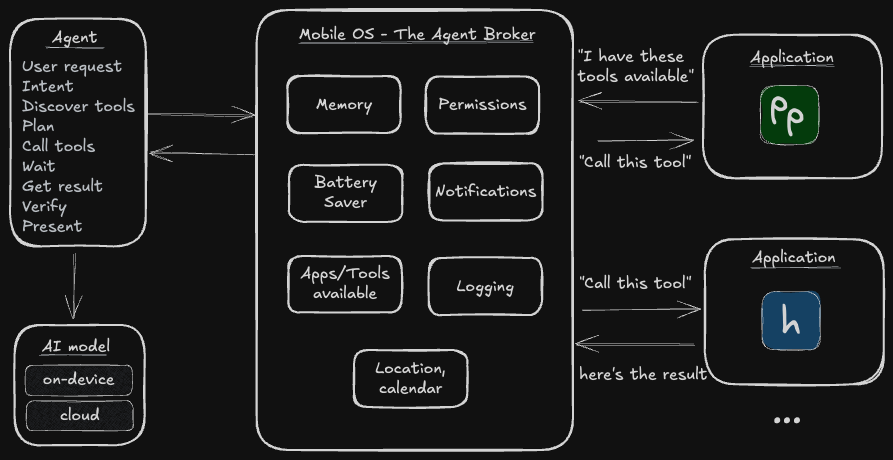
At its core, agents need some common functionality to unlock the full extent of their functionality.
Note: (detailed descriptions of what these are in verbose mode)
Memory - remembering previous context, facts and intent;
The Agent persistent state. Keeps track of facts, preferences & previous interactions. Examples could be “user is male mid-forties” or “user eats vegetarian and prefers to walk”. This avoids the agent re-asking the user every time.Permissions control - only able to access what they are allowed to access;
In charge of what the agent can actually do on the device, similar to how permissions like camera & location are already managed by the operating system. In addition, the operating system can control access via biometrics like FaceID, what applications (and their respective background functionality) the agent can and cannot access.
The Operating System is in charge of keeping the Agent in check.
Tool registry - what is available to the agent;
Keeping track of everything available to the Agent on this specific device. For example, a GMail application may register a “sendEmail” functionality, Messages may register “sendSMS” and “sendIMessage” etc. A user may have hundreds of applications installed and each one can register some form of functionality that can run in the backgorund and help the Agent complete its task.
The tool registry lets the agent discover what it can do.
User context - if memory is the history, this is the present state of the user;
A live snapshot of who the user is and what they are doing right now. The current app, time of day, location, recent activity, device state (e.g. locked, driving, in a call). With this information the agent is better suited to tailor its behaviour.Notifications & communication - bi-directional communication with the user;
Agents will want to notify the user some how; to ask for permission, notify about proactive changes. Mobile devices already have support for push notifications & alerts.
Operating systems already act as the broker between applications and the underlying hardware, but now they should become the broker between agent harnesses and applications. They are the gatekeepers providing a registry of tools, managing authentication (including biometric IDs for ease) and monitoring background usage of applications.
Only the operating system can be trusted to launch apps in the background, mediate permissions (including FaceID), enforce battery budgets and audit cross-app data flows. No third-party layer has (or should have) that power.
Additionally the Operating System could become the proxy to access models themselves. This would give the user power to restrict which AI models were being used by all installed agents. This may include local models in the future or from a provider that the user may trust or have a preference for.
Agent developers then focus on building the agent harness, the coordination between all of these elements in an efficient and practical way for the user.
This isn’t just Siri again - the key difference is plurality. Any agent can use the same brokered tools, leverage past and shared memory and coodrinate flows. Not only an assistant promoted by the vendor.
Opt-in and log
It starts with enabling these features. They’re not for everyone and mis-used they are a security risk. There must always be the ability to turn off AI & Agentic functionality at the operating system level.
Agents on device do open up users to the usual AI exploits such as prompt injection and as such should offer some amount of protection to the non-technical user. Once enabled (and risks explained), the operating system can also provide a few safety mechanisms:
- PII data redaction for personal data if relevant. This can even be done on device with small
models like
openai/privacy-filter. - An audit log of all interactions between Agent and App. On its own it’s too verbose for the standard user but the occasional popup - as is done today - explaining that Agent X has accessed Y application/data.
- A centralised security scoring mechanism in the app store. If multiple users start flagging that an agent is misbehaving, Apple or Google could quickly remove the guilty agent from the app store to limit fallout.
The OS sits between agent and app, enforces least-privilege and auditing every call.
Building on what’s there today
Arguably Android’s Android Intents and iOS App Intents are already steps into this direction.
Right now however, it seems that mobile platforms are looking to focus on developing the complete assistant experience themselves. Siri and Google Assistant - no matter how poor they perform or slow they are to update - come baked into the operating system with no clear way for anyone else to compete.
Adjusting their stance to enable others to integrate would still give Apple and Google the control over the ecosystem they want while enabling more innovation.
MCP and Skills for mobile?
Model Context Protocol (MCP) - a framework to define a way for AI to discover and use external services - was rapidly adopted as a standard in desktop that gave tool providers a unified way to expose functionality to the changing landscape of AI tools. Whether you use Claude Code, Cursor or Codex, you can add the MCP for Figma and expose the same functionality. It’s easy for Figma to maintain a single connection to all AI tools that support MCP.
In an ideal world there would a similar level of coordination between the mobile OS providers. It doesn’t have to MCP (and it likely won’t be as I don’t think it’s transferrable between desktop and mobile), but it should be a common standard so that apps and agents can be developed cross platform.
Skills - text files detailing how an Agent should perform a specific task with optional scripts or references to help it do so - are another emerging trend on desktop AI. These may actually transfer well to mobile agents and would offer more advanced users ways to modify the agent application to perform tasks in the specific way that they want it to be done. There will need to be a better way to get skills onto mobile, and to surface to layman users what actually the skill is doing, but this moves from a technology problem to a user experience/interface problem.
What would app developers need to do?
Once iOS/Android have released new SDK functionality to register tools, existing application
developers will need to register chunks of functionality with this SDK. Similar to MCP this will
likely include a tool name (that the operating system will namespace by application so even if two
apps register a getBalance function, there is no conflict), a short description of when the tool
should be called and what it provides, tool inputs if relevant (e.g. a getBalance may take an
optional date to get the balance at that particular time) and the required permissions (does the
user need to approve this with FaceID?). The OS should then take care of the rest, coordinating
agent interactions and permissions as required.
Agent developers on the other hand focus on building the logic to coordinate interaction between different components and implement developing standards. One size does not fit all, there is a need and gap for many different agent harnesses. These may be specialised on different verticals or try to become more general purpose.
Thinking into the future
Agents on mobile are coming and the OS vendors need to be ready for it. OpenClaw proved the model works on desktop and server models but the mobile adoption needs alterations to go mainstream.
We may end up with more “headless” applications, without a user interface, only providing tools/functionality to agents applications to interact with on device.
Bring back the Meta phone
I believe Apple and Google should be investing heavily to enable a stronger, broader AI ecosystem. But whether it’s them or a new entrant, the opportunity is the same.
For mobile adoption, it would make sense for Zuckerberg & Meta to revive Eye OS and make it an agent broker. They would even be able to deliver an out-of-the-box experience powered by their new Muse model family - “Scaling towards personal superintelligence”. Developers could offer headless applications accelerating and easing development to bridge the missing app ecosystem and users could interact with the majority of their applications through multi-purpose agent applications instead.
While it doesn’t specifically have to be a Facebook (or Windows) phone, I think there is an opportunity for a new mobile operating system to build these functionalities. It’s only a matter of time and would be a compelling motivation for app developers and sales point for consumers. Phones with this OS will enabling a new generation of personal assistants.
Could Anthropic or OpenAI launch something to compete with the status quo? Perhaps Musk & X could enable it and further the development of the X super-app.
The pieces are here and evolving. On-device models are getting better, server connections exist where they fail. (Some) users want this. Apps and data are already available on the phone. But the missing piece, the platform that coordinates the connections, needs to be built into the operating system. It remains unknown who will build the future, turning intelligence from a feature into a platform.